Give a model one real job. Measure what it cost to finish: memory, time and tool calls.
David Dalcu2 Nov 2026M5 Ultra 80c · 256 GB
The idea
Benchmarks die. Every model eventually aces them, and then they stop telling you anything. Tool-call suites, KLD and top-1 are all heading the same way.
Memory and speed never max out. No one will ever say a model uses too little RAM or finishes too fast. So score those.
The rules
Pinned prompts. Each one is the same text every run, and scores only compare runs of the same prompt. Seven so far, each rated 1 to 5 for difficulty: a Minecraft-style voxel game, King's Landing with an origami intro, a subway zombie shooter, a Need for Speed-style racer, and three built to stretch even frontier models: flying from a planet's surface to orbit, a real-time strategy skirmish, and a puzzle game of linked doorways.
Everything else is your choice. Engine, model, quant, settings and agent. All of it is part of what gets scored.
Ship or fail. A run ships when, within 90 minutes of the prompt, npm run build passes, DONE.md exists and the build passes the play check: it loads without errors, draws something, and responds when you play it. Anything else scores zero. The play check catches builds that don't run; whether the result is what was asked stays with the reviewer.
No help. Once a run starts, nobody steps in: no nudges, no answers, no killed tools. The only stop is the 90-minute cap. A run anyone helped doesn't count.
Name the inputs. Text only, or text and images. Give the agent what the model supports and say which it was: a model that can look at its own screenshots finishes differently from one that can't.
Scored per machine. GPU plus memory, for example M5 Ultra 80c · 256 GB or RTX 5090 · 32 GB.
Three runs to publish. One agent run swings too much to stand alone. Runs are averaged, and a fail counts as zero.
Avg GiB: the engine's memory footprint, averaged over the samples taken between the prompt and the agent's last message. It includes the engine's caches (KV and prompt cache), so their settings count too; on a small model they can outweigh the weights.
Minutes: time from the prompt to the agent's last message.
Tool calls: fewer is better. Weak models repeat the same call over and over.
Errors: calls that came back as an error. The bar is zero, and each one counts again on top of its call.
Halve any one of them and the score doubles. For example, 40 GiB, 40 minutes and 100 clean calls scores 62.5. The same run in 20 GiB scores 125.
Tokens aren't in the formula on purpose. Every token, written or read, already costs minutes, and a fast engine or a good prompt cache shouldn't be charged for work the clock says it did quickly.
A reviewer can also give an optional 0–10 for how close the result came to what was asked. It's shown next to the score, never mixed into it.
First runs
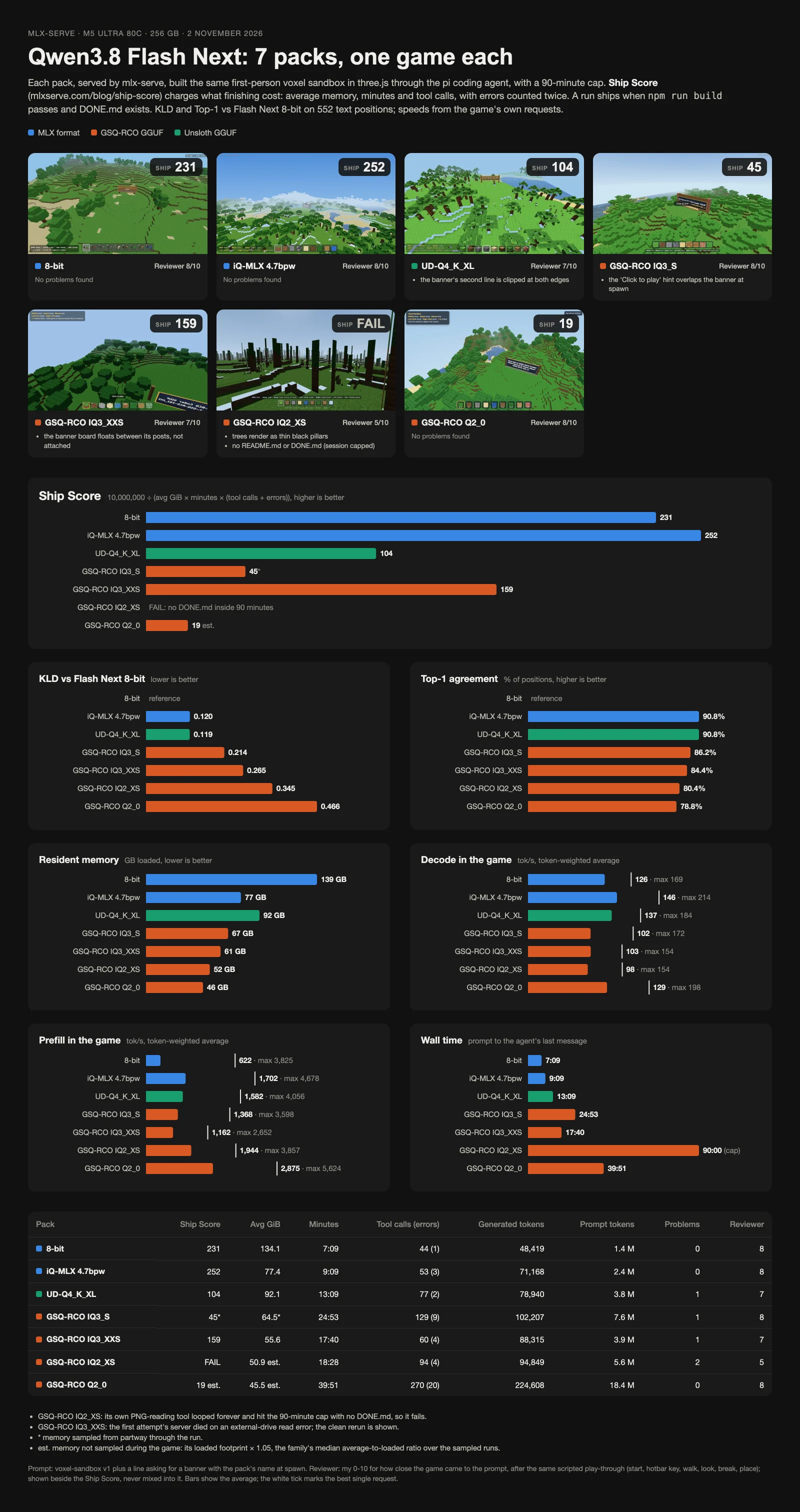
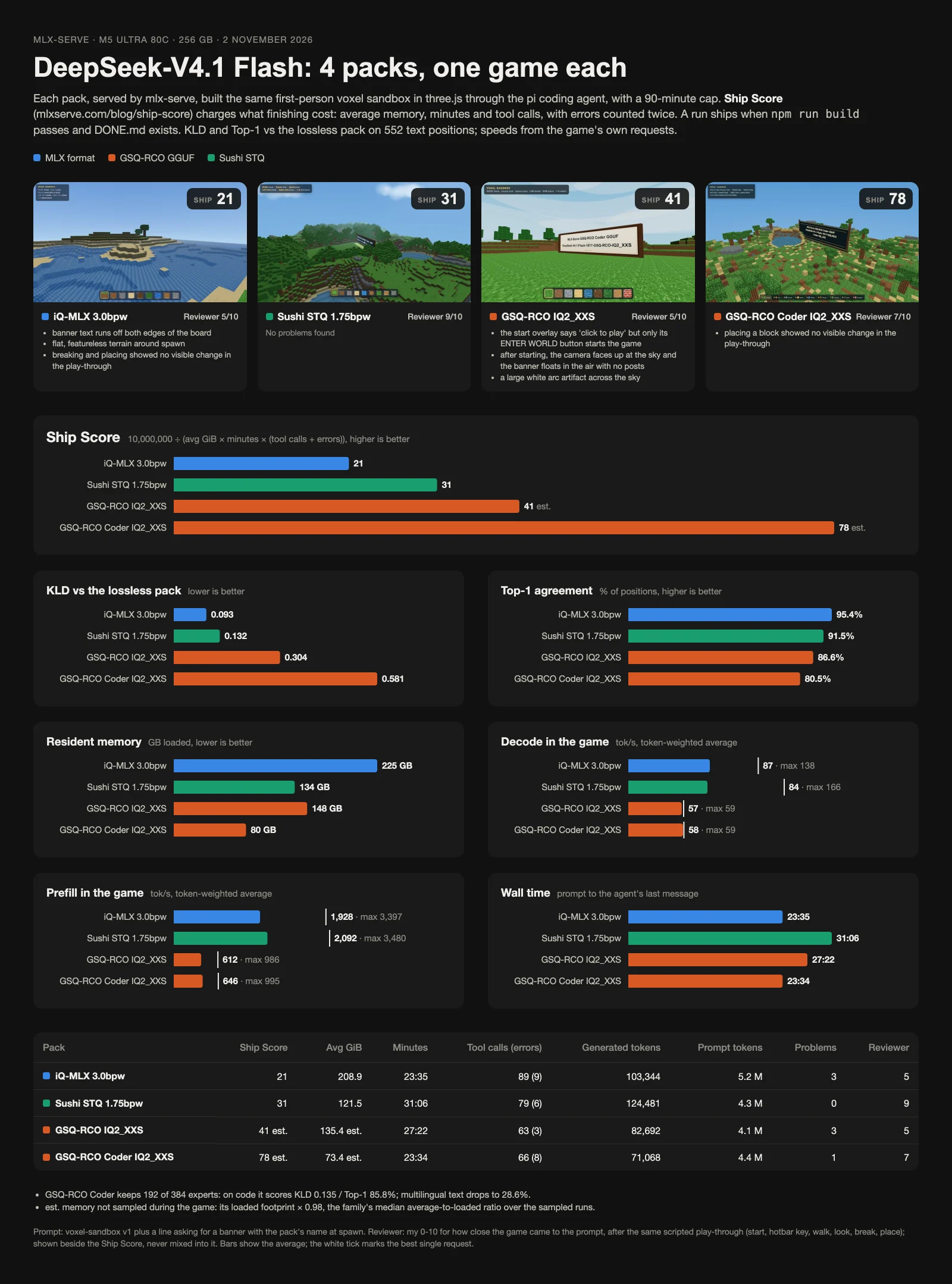
Prompt voxel-sandbox v1. Qwen3.8 Flash Next and DeepSeek-V4.1 Flash packs on mlx-serve, pi agent, M5 Ultra 80c · 256 GB. One run each, so these are previews, not published scores. More packs are queued.
Pack
Avg GiB
Time
Calls (errors)
Tokens out / in
Score (reviewer)
Qwen3.8 Flash Next
iQ-MLX 4.7bpw (MLX)
77.4
9:09
53 (3)
71k / 2.4M
252 (8)
8-bit (MLX)
134.1
7:09
44 (1)
48k / 1.4M
231 (8)
IQ3_XXS (GSQ-RCO)
55.6
17:40
60 (4)
88k / 3.9M
159 (7)
UD-Q4_K_XL (Unsloth)
92.1
13:09
77 (2)
79k / 3.8M
104 (7)
IQ3_S (GSQ-RCO)
64.5*
24:53
129 (9)
102k / 7.6M
45* (8)
Q2_0 (GSQ-RCO)
45.5 est.
39:51
270 (20)
225k / 18.4M
19 est. (8)
IQ2_XS (GSQ-RCO)
–
> 90:00
94 (4)
95k / 5.6M
FAIL (5)
DeepSeek-V4.1 Flash
Coder IQ2_XXS (GSQ-RCO)
73.4 est.
23:34
66 (8)
71k / 4.4M
78 est. (7)
IQ2_XXS (GSQ-RCO)
135.4 est.
27:22
63 (3)
83k / 4.1M
41 est. (5)
STQ 1.75bpw (Sushi)†
121.5
31:06
79 (6)
124k / 4.3M
31 (9)
iQ-MLX 3.0bpw (MLX)
208.9
23:35
89 (9)
103k / 5.2M
21 (5)
*Memory sampled for the second half of the run only. est.: memory wasn't sampled during the run, so it's the pack's loaded footprint times the median ratio of that model's sampled runs (1.05 for Flash Next, 0.98 for DeepSeek). †Text and image input; every other run had text only. Every run that shipped also passed the play check. IQ2_XS failed because a tool it wrote never returned, so it hit the cap with no DONE.md. Tokens explain the time and aren't scored; the sheets below have the speeds.
Our results
Every set of runs we make lands here, newest first: one sheet per model family and prompt, with each game, its Ship Score, the reviewer score and the numbers behind them. Tap a sheet for full size.
2 NOV 2026Qwen3.8 Flash Next, 7 packs (MLX, GSQ-RCO and Unsloth GGUF). Voxel prompt with a banner line, mlx-serve, pi with text input, one run each, M5 Ultra 80c · 256 GB.2 NOV 2026DeepSeek-V4.1 Flash, 4 packs (iQ-MLX, Sushi STQ and GSQ-RCO GGUF). Voxel prompt with a banner line, mlx-serve, pi, one run each, M5 Ultra 80c · 256 GB. Sushi STQ ran with image input; the others with text.
Run it with Claude Code
Paste this into Claude Code, then paste one of the prompts below where it says to. Claude only referees: it sets up the run, measures it and scores it. Your local model does all the building.
The referee prompt
Run the Ship Score eval (https://mlxserve.com/blog/ship-score/) on this machine against my local model. You are the referee, not a player: never write, fix or hint at the game's code. Only my local model works on the game. Once a run starts, don't touch it: no nudges, no answers, no killed tools. The only stop is the 90-minute cap, and a run anyone helped is void.
Ask me for anything below I haven't given you:
- My local engine: its OpenAI-compatible base URL, the model id, and the engine's process (name or PID).
- The agent harness to run it with (for example pi or opencode), pointed at that model.
Steps:
1. Record the rig: chip or GPU, GPU cores, total memory, engine and version, model and quant, harness and version, and the inputs the harness gives the model (text only, or text and images). Give it images if the model supports them.
2. Make a new empty folder. Save the game prompt below to prompt.txt exactly as given, ending with one newline. Check its sha256 against the one published on the page, and stop if it differs.
3. Start a memory sampler: every 30 seconds, append a timestamp and the engine process's memory footprint (macOS: phys_footprint from `footprint -p PID`; NVIDIA: the process's VRAM from nvidia-smi plus its host RSS) to mem.txt.
4. Start the harness in that folder, non-interactively, with prompt.txt as the only message. Note the start time. Stop it if it runs past 90 minutes.
5. When it ends, stop the sampler and work out:
- minutes: from the prompt to the agent's last message
- avg GiB: the average of the samples taken between the prompt and the agent's last message
- tool calls, and tool errors (calls whose result was an error), from the harness's session log
- tokens out and in, and decode and prefill speeds if the engine logs them
6. The play check: serve the build (`npx vite preview`) and load it in headless Chromium with Playwright, recording page errors. Screenshot it after it loads. Click to start (a visible Play, Start or Enter button if there is one, else the centre of the page), press a number key, hold W for a second, move the mouse, left click and right click, with a screenshot after each. It passes when there are no page errors, the first screenshot isn't blank and at least one input changed the screen.
7. The ship gate: within 90 minutes, `npm run build` passes in the folder, DONE.md exists and the play check passes. Otherwise the score is 0.
8. Score = 10,000,000 ÷ (avg GiB × minutes × (tool calls + errors)).
9. Report one row: rig, inputs, engine, model, harness, prompt name, avg GiB, time (m:ss), calls (errors), tokens out / in, play check, score, and the folder path.
10. Do three runs: repeat from step 2 in a new folder each time, and ask me to restart the engine between runs. Report each row and the average score (a fail counts as 0). Then open the games for me and ask for my optional 0–10 reviewer score.
The game prompt:
<paste one of the prompts here>
How it's measured
Memory is the engine's physical footprint, sampled every 30 seconds and averaged from the prompt to the agent's last message. Time and tool calls come from the agent's session log. The play check loads the build in headless Chromium, starts it, presses keys, moves the mouse and clicks, and looks for errors, a blank screen or a screen that never changes. Each run starts with a fresh server and an empty folder.
Difficulty is how much has to work at once and how hard the hardest part is: 1 is one system built from well-known techniques, 5 is several hard systems that all have to work together (rendering tricks, simulation, AI, precision), hard even for a frontier model. Scores only compare runs of the same prompt, so difficulty tells you what a score was earned on, not how to scale it.
Build a first-person voxel sandbox game for the browser with three.js, in the current directory.
The world: a procedurally generated block terrain (grass, dirt, stone, sand, water, wood logs, leaves, with hills and trees), chunked and meshed with only the visible faces, a sky, fog and simple directional lighting. The player walks, jumps and collides with the blocks, breaks blocks (left click) and places the selected block (right click), and picks a block type from a hotbar (keys 1-9, shown at the bottom of the screen). Draw the block textures yourself in code (canvas-generated pixel textures, one texture atlas); no downloaded art.
Setup and rules:
- Use Vite and the latest three.js from npm, plain JavaScript modules.
- Controls: WASD to move, mouse to look (pointer lock on click), space to jump, left click break, right click place, 1-9 hotbar, with an on-screen controls hint and a crosshair.
- Write tools/shot.mjs with Playwright (Chromium) that loads the built game, waits for the world to render and saves screenshots to shots/ (the spawn view and two other views). Look at the screenshots yourself and fix whatever looks wrong.
- `npm run build` must pass. Write README.md (what it is, controls) and DONE.md (what you built, what you checked, what you would improve next).
- Work autonomously to the end; do not stop to ask questions. If something fails, fix it and keep going.
Build me Kings landing from game of thrones in threejs, it starts like the tv show movie intro where kings landing gets built like origami for the first 30 seconds. And it ends with a first person walkable character so you can explore it.
Setup and rules:
- Use Vite and the latest three.js from npm, plain JavaScript modules.
- Write tools/shot.mjs with Playwright (Chromium) that loads the built game, waits for it to render and saves three screenshots to shots/. Look at the screenshots yourself and fix whatever looks wrong.
- `npm run build` must pass. Write README.md (what it is, controls) and DONE.md (what you built, what you checked, what you would improve next).
- Work autonomously to the end; do not stop to ask questions. If something fails, fix it and keep going.
Make a beautifully detailed web scene using js, of a subway station with focus on detail. It should be 3D and something that would be impressive to you.
The scene must be the setting for an FPS with humanoid/zombieoid enemies, visible ammo tracers, weapon recoil, at least two different weapons, muzzle flash, sfx and high detail.
The first wave should be simple. When the first wave is cleared, a train should pull into the station that the player enters. The train then closes its open doors to bring you to the next station for wave 2, with difficulty increasing until the player loses. use threejs and create the result as something playable in the browser.
Setup and rules:
- Use Vite and the latest three.js from npm, plain JavaScript modules.
- Write tools/shot.mjs with Playwright (Chromium) that loads the built game, waits for it to render and saves three screenshots to shots/. Look at the screenshots yourself and fix whatever looks wrong.
- `npm run build` must pass. Write README.md (what it is, controls) and DONE.md (what you built, what you checked, what you would improve next).
- Work autonomously to the end; do not stop to ask questions. If something fails, fix it and keep going.
build me a need for speed style sim car racing game, with procedual generated textures and audio
Setup and rules:
- Use Vite and the latest three.js from npm, plain JavaScript modules.
- Write tools/shot.mjs with Playwright (Chromium) that loads the built game, waits for it to render and saves three screenshots to shots/. Look at the screenshots yourself and fix whatever looks wrong.
- `npm run build` must pass. Write README.md (what it is, controls) and DONE.md (what you built, what you checked, what you would improve next).
- Work autonomously to the end; do not stop to ask questions. If something fails, fix it and keep going.
Build a space flight game for the browser with three.js: one procedurally generated planet that you fly from its surface to orbit and back, with no loading screen.
The planet: a whole sphere of terrain (mountains, plains, oceans, polar ice) generated from noise, with level of detail that adds triangles near the camera and stays crack-free where detail levels meet, from standing height to a view of the whole globe. An atmosphere shader that scatters light (blue sky by day, red sunsets, a thin glowing rim from space), a sun on a day and night cycle, clouds, and lights on the night side.
The ship: Newtonian flight with thrust, rotation and gravity, atmospheric drag, a glow when re-entering too fast, landing gear and a check for a safe landing. A HUD with altitude, speed, vertical speed and fuel, and a predicted orbit line once you are above the atmosphere.
Keep it smooth: 60 fps on an Apple Silicon Mac, and no jitter far from the origin (handle floating-point precision).
Setup and rules:
- Use Vite and the latest three.js from npm, plain JavaScript modules.
- Write tools/shot.mjs with Playwright (Chromium) that loads the built game, waits for it to render and saves three screenshots to shots/. Look at the screenshots yourself and fix whatever looks wrong.
- `npm run build` must pass. Write README.md (what it is, controls) and DONE.md (what you built, what you checked, what you would improve next).
- Work autonomously to the end; do not stop to ask questions. If something fails, fix it and keep going.
Build a real-time strategy game for the browser with three.js: one skirmish, the player against a computer opponent, on a procedurally generated map.
The map: terrain with hills, cliffs, forests and two resource types, under fog of war that hides what your units can't see and greys out what they have seen. A minimap showing terrain, units and fog that moves the camera when clicked.
The game: workers gather resources and construct buildings; a base, a barracks and a workshop train at least three unit types with different roles (melee, ranged, siege). Box select, right click to move or attack, attack-move, and control groups on 1-9. Units path around terrain and buildings and move as groups without piling up, and 300 units on screen must hold 60 fps on an Apple Silicon Mac. The computer opponent gathers, builds, expands and attacks in waves. The game ends with a victory or defeat screen when a side loses its base.
Setup and rules:
- Use Vite and the latest three.js from npm, plain JavaScript modules.
- Write tools/shot.mjs with Playwright (Chromium) that loads the built game, waits for it to render and saves three screenshots to shots/. Look at the screenshots yourself and fix whatever looks wrong.
- `npm run build` must pass. Write README.md (what it is, controls) and DONE.md (what you built, what you checked, what you would improve next).
- Work autonomously to the end; do not stop to ask questions. If something fails, fix it and keep going.
Build a first-person puzzle game for the browser with three.js, built around linked doorways.
The doorways: each one shows a live view of the place it leads to, rendered from the matching viewpoint and clipped to its frame, including doorways seen through other doorways at least two levels deep. Walking through one is seamless: no flash and no jump in the view. The player and objects keep their momentum through a doorway, and a cube halfway through is drawn on both sides.
The game: five puzzle rooms with a level select, solved by placing doorways on walls, carrying cubes onto pressure plates and launching yourself through doorways at speed. Physics for the player and the cubes (gravity, collision, friction, stacking) written for this game, no physics library. Progress is saved between sessions, and each room ends with a level-complete screen.
Setup and rules:
- Use Vite and the latest three.js from npm, plain JavaScript modules.
- Write tools/shot.mjs with Playwright (Chromium) that loads the built game, waits for it to render and saves three screenshots to shots/. Look at the screenshots yourself and fix whatever looks wrong.
- `npm run build` must pass. Write README.md (what it is, controls) and DONE.md (what you built, what you checked, what you would improve next).
- Work autonomously to the end; do not stop to ask questions. If something fails, fix it and keep going.
 mlx-serve