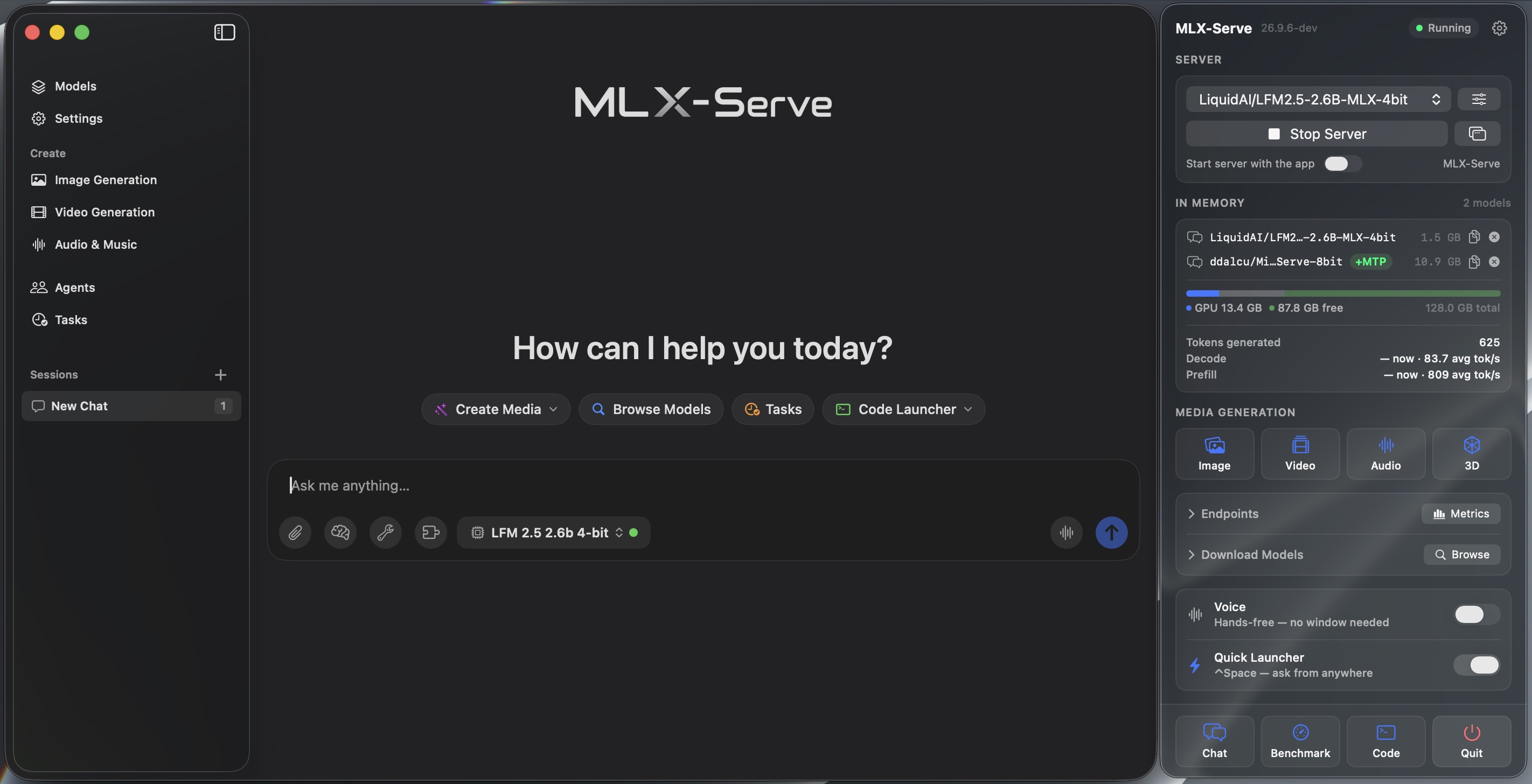
Chat with it, ask it about your own documents, make images, music, video and 3D, and let it run errands on your computer — free, open source, and fully offline. It runs every major open model, faster than LM Studio, and nothing you type ever leaves the machine.
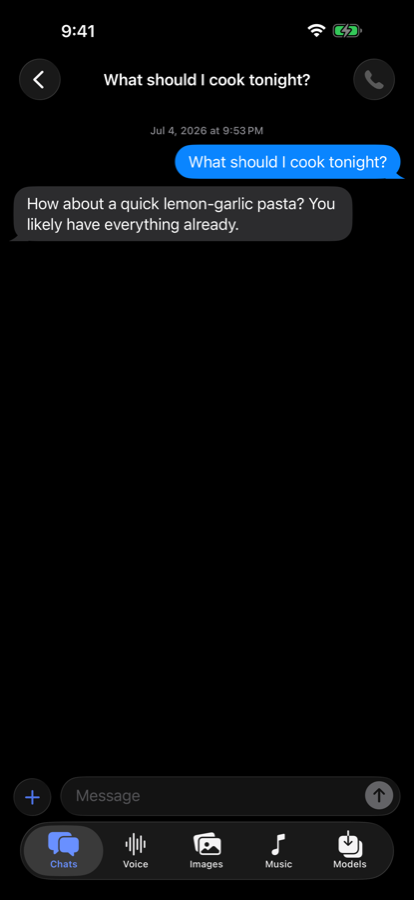
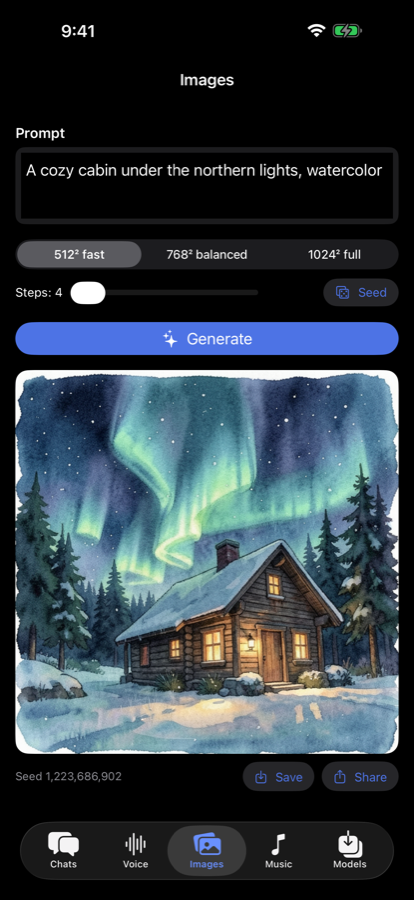
MLX Chat — Local AI puts this exact open-source engine on your iPhone: chat, voice cloning, image and music generation — all on-device, all offline.
It's not a companion app that phones home to a server — the same mlx-serve engine behind everything on this page is compiled straight into the app and runs on the phone's GPU. No cloud, no account, and it works in airplane mode.
Needs a recent iPhone — A17 Pro-class or newer, iOS 26+.
The fastest way to "get" it. Each takes under a minute — and each is something only an AI on your own Mac can do.
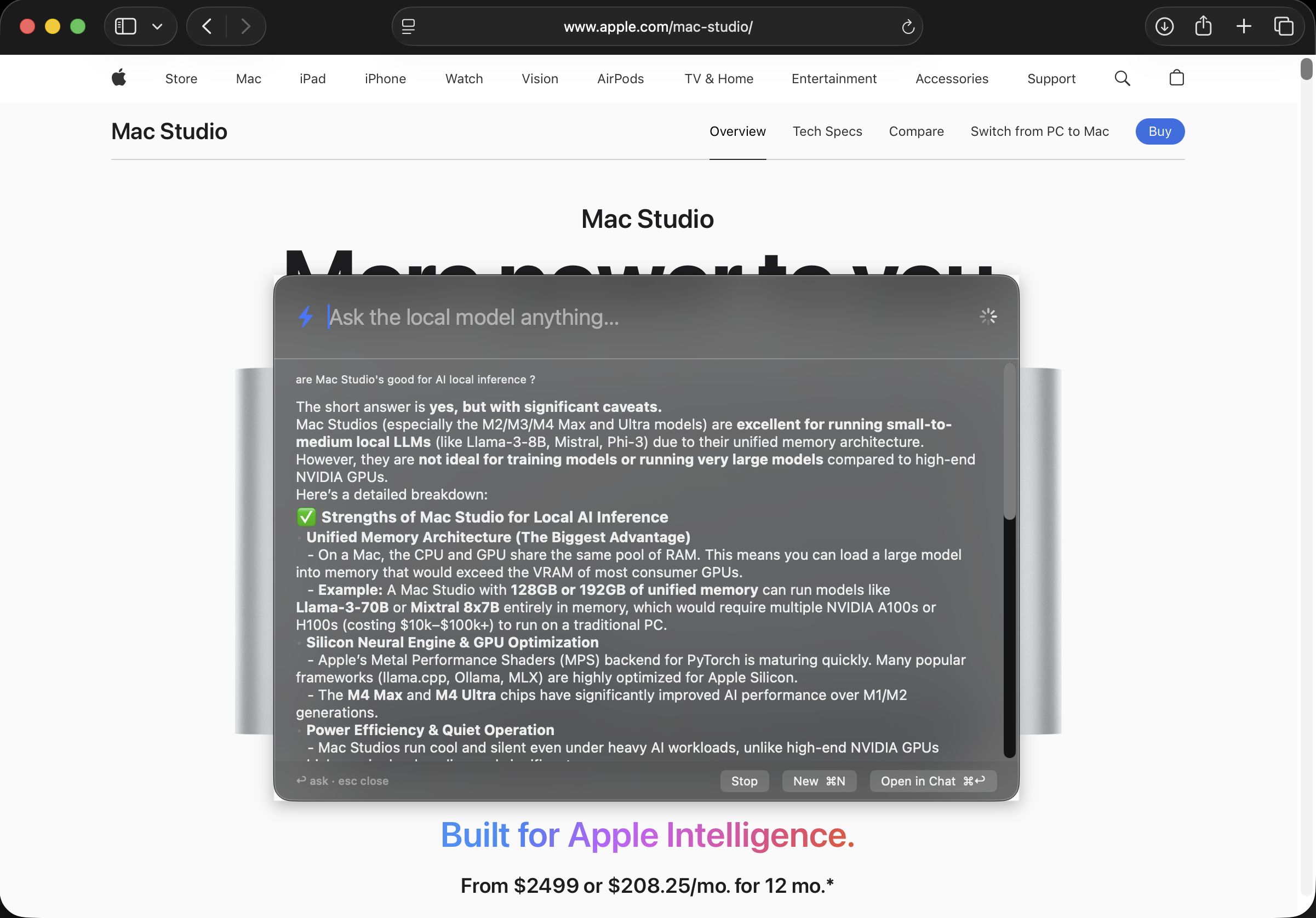
Press ⌃Space over any app — your browser, an email, a game — and a little prompt box appears. Ask your question; the answer streams in right there. No tab-switching, no logging in.
It's the fastest quick-question, "what's the word for…" habit you'll pick up. Follow-ups remember the conversation, and Esc tucks it away.
Drag a folder into the chat and ask about what's inside — a lease, a stack of PDFs, your class notes, a pile of receipts. "Which invoice is unpaid?" · "Summarize this into five bullets." · "Quiz me on chapter 3."
Because nothing leaves your Mac, this is the stuff you'd never paste into an online chatbot — taxes, medical letters, contracts — answered safely at home.
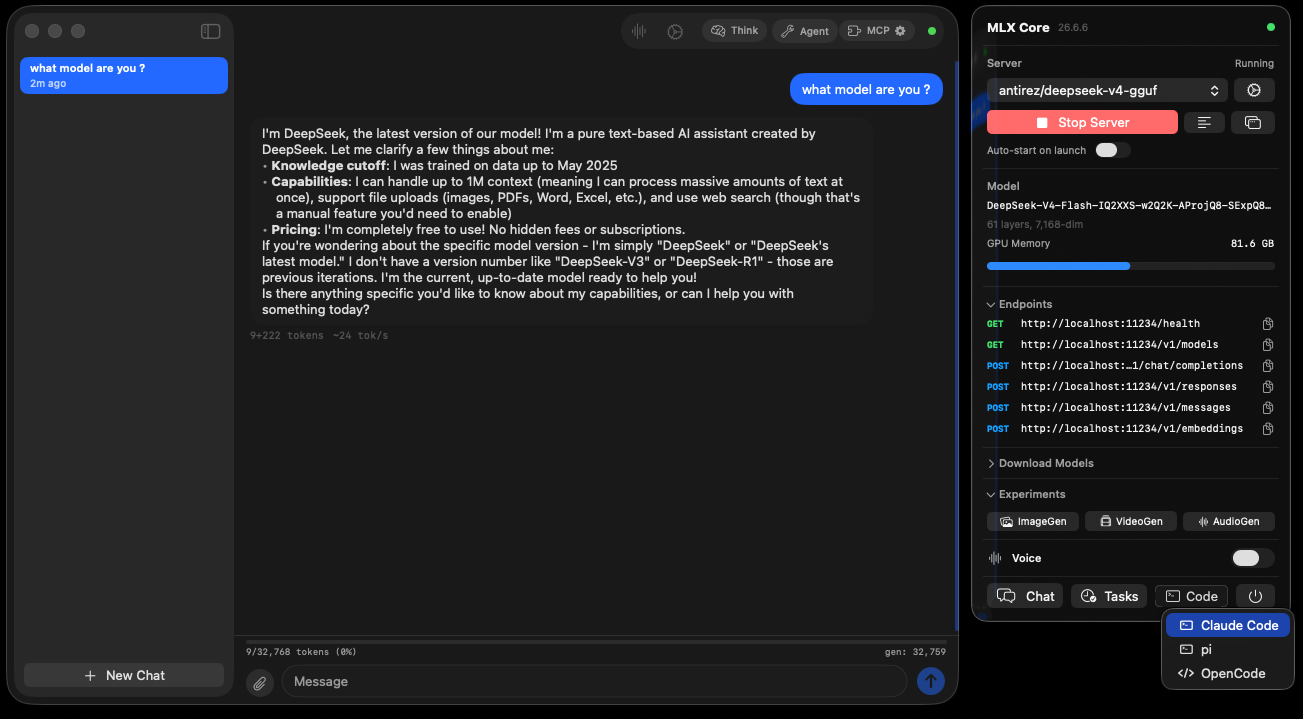
Turn on Voice Mode from the menu bar, say "Hey Loki," and speak. It listens, thinks, and answers out loud — perfect while cooking, tidying, or away from the keyboard. Your voice is transcribed on the Mac and never uploaded.
Want it to reply in a familiar voice? Record a short clip and it can even answer in a cloned voice.
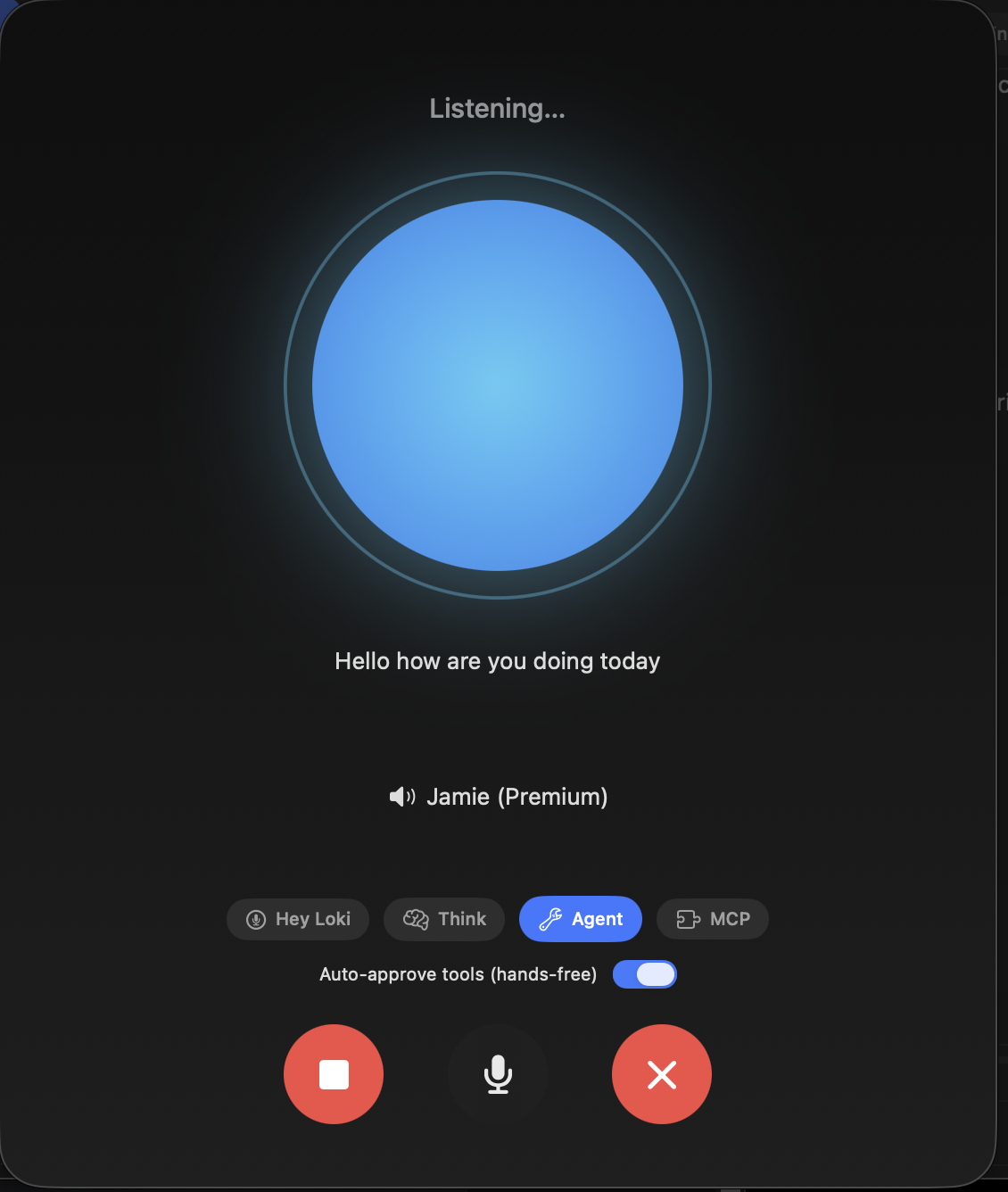
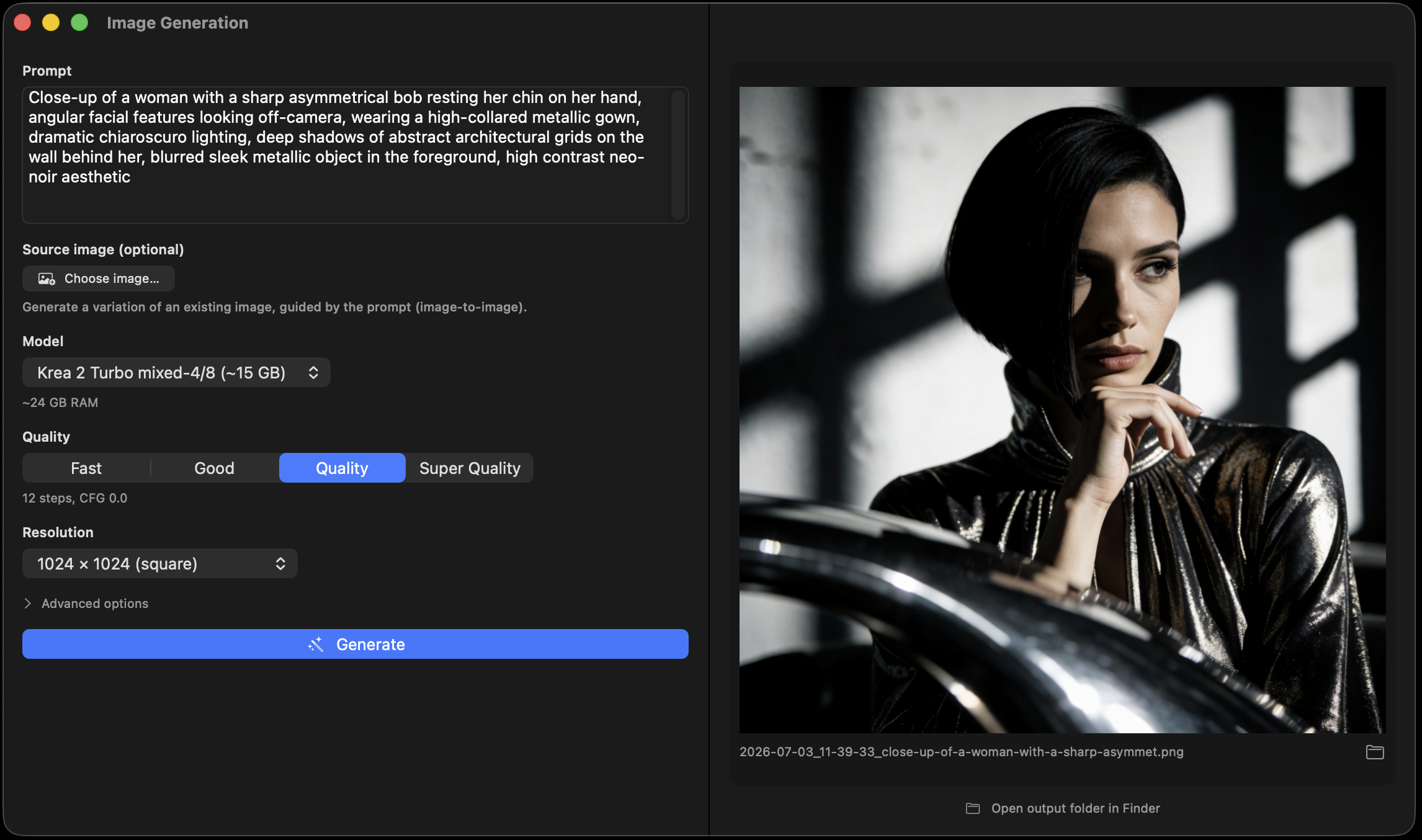
Pictures, music, voices, video, even 3D models — all generated on your Mac, with no monthly fee and no watermark. Pick a tab, describe what you want, and go.
Describe a picture — "a watercolor fox in a snowy forest at golden hour" — and get it in seconds. Great for cards, wallpapers, posters, and ideas.
Drop in a photo and say "make the sky a sunset" or "remove the background." It keeps the rest of the picture — no design skills needed.
"Lo-fi study beat, 90 bpm, rainy." Get original background music and jingles you can actually use — nothing to license.
Turn writing into natural speech — DIY audiobooks, voiceovers, or practice scripts — optionally in a voice you cloned from a few seconds of audio.
Animate a still image or generate a short clip from a prompt — with a soundtrack, or characters that speak your lines.
Snap or drop a single photo and get a 3D model out — handy for 3D printing, games, and AR tinkering.
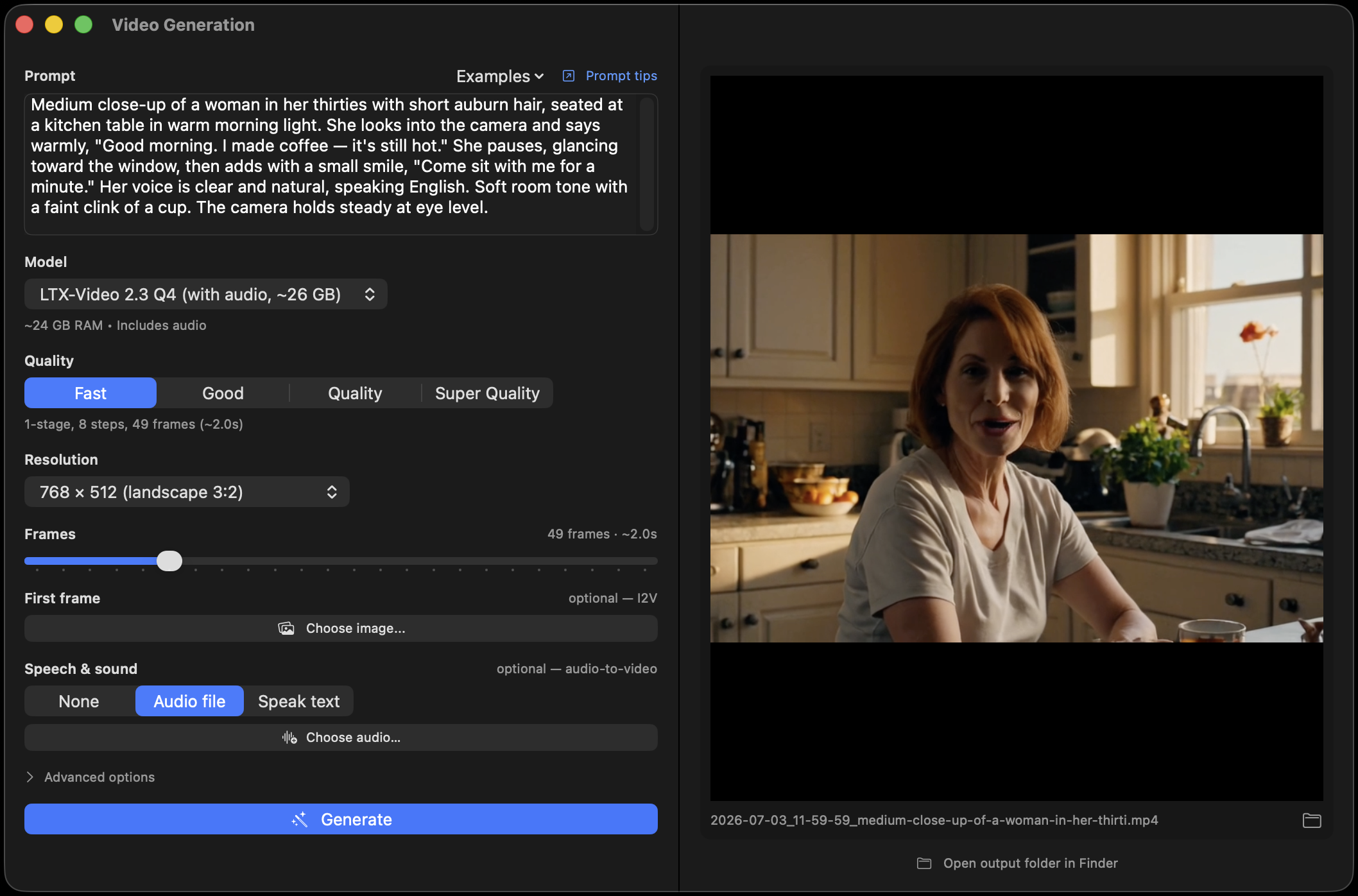
Flip on Agent mode and it can tidy files, look things up, and build small things for you — with a safety rail you control.
Ask in plain words: "Organize my Downloads folder by type." · "Rename these photos by the date they were taken." · "Build me a little birthday-countdown web page" — and it opens it in your browser when it's done.
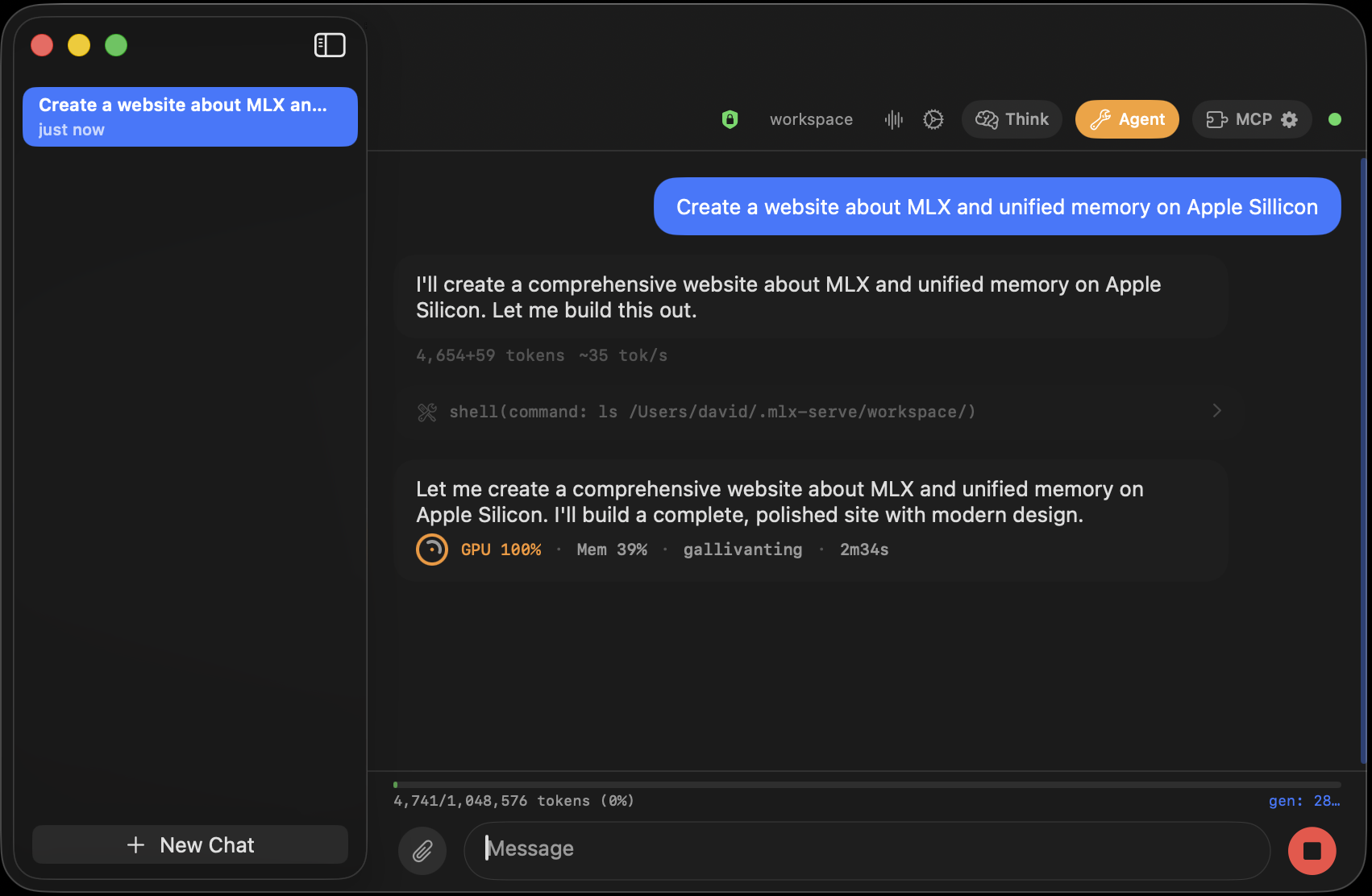
Hand it a recurring task — "every morning at 8, summarize my watched sites" — and it runs on its own, saving a transcript each time.
TelegramMessage your own model from anywhere through a private Telegram bot — no cloud AI, and only your chat can reach it.
For the curiousCoding assistants, a built-in API, and a sandbox are all in there — ignore them until you're ready, then dive in.
A cloud chatbot meters you, remembers you, and needs a signal. This one asks for none of that — because it never leaves your Mac.
The friendly 5-minute tour — free, private, offline.
Get started → Create“Make the hair blue” — subject, pose & scene survive.
Deep dive → AnimateClips with synced sound — even talking characters.
Deep dive → ComposeOriginal 48 kHz stereo music — lyrics optional.
Deep dive → SculptOne picture in, a textured GLB mesh out.
Deep dive → SpeakSix seconds of audio, no transcript, all local.
Deep dive → CodeYour coding agent, offline, no API key.
Deep dive → Ask⌃Space launcher, voice, phone & schedules.
Deep dive → UnleashShell commands hit a Linux VM, not your Mac.
Deep dive → Compare+26% on identical models, defaults vs defaults — keeps your library.
Deep dive → SwapYour Ollama apps connect unchanged.
Deep dive → AccelerateSpeculative decoding, verified exact.
Deep dive → TrustSmall-model mistakes repaired mid-flight.
Deep dive → RankCommunity S-tiers, filtered to your Mac's memory.
Cast your vote → MeasureReal tok/s by chip, GPU cores and memory, submitted from the app.
See the numbers →Under the hood, the MLX-Serve app runs mlx-serve — a native Zig inference server for Apple Silicon with OpenAI- and Anthropic-compatible APIs. Identical 4-bit MLX weights, same machine, same prompts: it wins every cell, and speculative decoding pushes the lead further where it counts. Full LM Studio comparison →
Code completion — where the drafter and native MTP shine. Tokens per second — how fast the AI writes; higher is better. Apple M4 Max (128 GB) · identical 4-bit MLX weights · ctx 4096 · temp 0 · LM Studio (MLX runtime) as baseline.
The 284-billion-parameter flagship — running on your own machine, no cloud, no API key. If you have a 96 GB+ Apple Silicon Mac, it's one click away in the Model Browser.
Generate multiple tokens per forward pass, verified exactly — so output is identical, just faster. Works on every API surface, streaming or not, tools included: agent loops that echo file contents into edits decode at ~2×. Smart gates keep it on where it pays and step aside where it doesn't.
Model-agnostic n-gram drafting from the prompt + generated text. Works on every architecture — Gemma, Qwen, Llama, Mistral, Nemotron-H, LFM2.5 — with nothing extra to download.
A tiny cross-attention drafter reuses the target model's own K/V cache to propose blocks of tokens. Tuned block sizes per target (E2B → 31B).
Qwen 3.5/3.6 checkpoints with a trained MTP sidecar draft with the model's own head — 3 tokens per round, a controller that self-tunes depth per request, MoE sidecars included. Auto-loads, zero setup.
A prompt-time repetition score disables drafting on novel content; a runtime acceptance gate backs off mid-decode when drafts stop landing. You never pay for speculation that won't pay back.
How fast is native MTP? On Qwen3.6-27B 4-bit (M4 Max, v26.7.12): code completion 28 → 78 tok/s (2.8×) with the checkpoint's own MTP head, loaded from a sidecar like ddalcu/Qwen3.6-27B-4bit-MTP-MLX-Serve or straight out of an oMLX oQ checkpoint. In same-checkpoint head-to-heads on shipping defaults (v26.8.3), mlx-serve out-decodes MTPLX 2.5.3 by +10% with +17% prefill and a third of the time to first token (494 ms vs 1528 ms) on its own MTPLX-Optimized build, and oMLX 0.5.2's Lightning MTP at every rung from 0.5K to 16K on oMLX's own oQ4e checkpoint (+25% to +36%). Speculative decoding, in depth →
Everything a private AI setup needs in one Mac app — plus the deep dives above when you want the full story on any of it.
One lightweight native app — no dependencies, no setup scripts, no gigabyte runtime. The first answer after launch comes 3.5× faster thanks to eager warmup, and warm conversation turns round-trip in about 0.1 s.
Claude Code, Cursor, Continue, Raycast, Open WebUI — anything built for OpenAI or Anthropic can talk to your Mac instead of the cloud. Streaming, tool calling, embeddings, and WebSockets included.
Run Claude Code locally →mlx-serve speaks Ollama's language natively, so tools built for it — Raycast, Obsidian, Enchanted, Open WebUI — connect unchanged: same models, faster engine. And mlx-serve run gemma4 downloads, serves, and chats from one command.
Multiple conversations decode together through one model — about 1.6× total throughput at 4-way parallel — and every stream stays byte-accurate under load, verified by a 24-hour stress test.
The working memory a long conversation needs can be compressed up to ~4×, so 16K-token contexts fit on Macs that couldn't hold them before — or you serve more chats in parallel at the same length.
Re-opening a long conversation used to mean sitting through a full re-read of its history. The prefix cache now persists to SSD, so work the server already did is restored instead of recomputed — across model switches, app relaunches, and reboots. A chat that took 40 seconds to warm up answers in under 3, with byte-identical output. Opt-in from Settings, since it can hold gigabytes.
Flip on Metrics panel and the server's own homepage grows a live dashboard: decode and prefill tokens/sec with sparklines, requests in flight, time-to-first-token, cache hit rate, GPU load and memory — moving as you generate, including through a long prompt. The same numbers export at a Prometheus /metrics endpoint under vLLM-compatible names, so existing Grafana dashboards work unchanged. Opt-in, with no measurable cost to tokens/sec.
Serving to other machines? Set an API key and every off-box request — OpenAI, Anthropic, and Ollama APIs, plus the metrics page — has to present it, as a Bearer token, x-api-key, HTTP Basic, or a query parameter. Your own Mac stays trusted and key-free, so local apps and tools carry on untouched.
Ten built-in tools — shell, file read/write/edit, search, browse, web search, memory — with a per-tool approval dialog. Connect MCP servers from a curated marketplace, or extend with markdown skills.
One toggle routes every agent shell command into an isolated Linux VM built on Apple's own Virtualization framework. It boots in under a second, servers the agent starts mirror live to localhost, and a green shield shows when commands run isolated. Let the agent go wild — your files stay untouched.
A Spotlight-style panel that summons over any app: hit ⌃Space, type, and the answer streams in from your local model — no window shuffling. Follow-ups keep their context, ⌘↩ hands the thread to the chat window, and Esc dismisses while the reply finishes in your sidebar.
The always-on assistant →A Model Browser built around what you already have: Discover to find new models, My Models for everything this Mac can load — including what LM Studio downloaded and your own folders — and Downloads with a live badge. Finished models stay listed with a one-click Use, and a badge marks whichever one the server is actually serving. Resumable HuggingFace transfers, hot-switching in place, no restart.
Google's DiffusionGemma composes 256-token blocks in parallel instead of word by word — up to 25 tokens per pass, ~30% faster than the reference implementation — and streams block-by-block into any chat app.
Attach a folder of mixed files — notes, PDFs, exports — and ask in plain language. About 500 files index in ~7 seconds, everything stays in memory, and nothing leaves your Mac.
Make a bot, paste its token, flip a switch — and message your local model from your phone, anywhere. No public URL, port-forwarding, or cloud relay; it long-polls over your normal connection, even behind home Wi-Fi. Turn on Agent mode to run tools and edit files from your phone; the bot locks to the first chat that messages it.
Say “Hey Loki” and just talk. Speech is transcribed on-device with Apple's recognizer — audio never leaves your Mac — and the reply is spoken back in a system voice, with barge-in to interrupt mid-answer. Works from the menu bar with no window open; flip on Agent mode to run tools by voice.
Give it 6–8 seconds of any voice and it speaks your text in that voice — zero-shot, no training. Runs fully local on Qwen3-TTS with adjustable speed and expressiveness; the reference audio alone clones the voice, no transcript needed — validated bit-for-bit against the reference.
Voice cloning, in depth →Krea-2-Turbo (12.9B, photorealistic) and FLUX.2 run entirely on your Mac — validated pixel-faithful to the reference, any size 256²–2048². And it edits, not just generates: attach a photo, type "make the hair blue", and the subject, pose, and scene survive. Image-to-image variations with a strength slider, runtime style LoRAs, inline generation from chat. Nothing leaves your Mac.
Editing & LoRAs, in depth →LTX-Video 2.3 turns a prompt, a photo, or a soundtrack into a 24 fps clip with synced audio, all on-device. Put spoken lines in quotes and your characters talk; attach a real voice clip — or a line spoken by local TTS — and the performance follows it, original audio muxed into the MP4. Animate a photo from the First-frame slot; two-stage presets when you want maximum quality, ~2× faster this release.
Video generation, in depth →New: describe a track — "upbeat synthwave with driving bass" — optionally paste lyrics, and ACE-Step 1.5 Turbo composes original 48 kHz stereo music in 8 diffusion steps, entirely on-device. 10 seconds to 10 minutes; BPM, key, and time signature steerable; instrumental or vocal. Every track saves its exact prompt and settings beside it, so any take is reproducible.
Music generation, in depth →New: drop in a photo and Hunyuan3D-2.1 — ported natively to Apple Silicon — builds a 3D mesh: the subject is cut out automatically, the shape is generated on-device, and an optional full-PBR paint stage textures it from the same photo. The finished GLB spins in a built-in viewer and opens anywhere glTF does.
Photo → 3D, in depth →MLX-Serve checks the releases page once a day and shows a banner when a new version ships — one click downloads the notarized build, swaps it in place, and relaunches. Models, chats, and settings untouched. And the welcome screen now installs the mlx-serve command onto your PATH with one click.
Define a task once and let it run unattended — once, on an interval, daily, or weekly — even with no window open. Each run is a full agent with tool access (auto-approve or approve per call) and a saved transcript you can read back.
Point Claude Code, pi, or OpenCode at your local model from a folder picker — the app wires up the environment and routes every request to mlx-serve. Each agent is handed the context window your model actually serves, not a hardcoded guess, and a turn that spends ten minutes writing one big file streams to completion instead of dying at its client's five-minute timeout. Real coding agents, your code and prompts never leaving your machine.
Claude Code, fully local →Download the app, pick a model, go. Prefer a terminal? Two commands.
# Install via Homebrew (or grab the app from Releases)
brew tap ddalcu/mlx-serve https://github.com/ddalcu/mlx-serve
brew trust ddalcu/mlx-serve
brew install mlx-serve

# One command: download, serve, chat — Ollama-style
mlx-serve run gemma4

# Or serve everything you've pulled, loading on demand
mlx-serve serve
# Asks for your mlx-serve address (Enter = localhost:11234) and an agent, installs it if needed, starts it
curl -fsSL https://mlxserve.com/agent.sh | sh
curl http://localhost:11234/v1/chat/completions \
  -H "Content-Type: application/json" \
  -d '{
    "messages": [{"role": "user", "content": "Hello!"}],
    "stream": true
  }'

# Point Claude Code at your Mac
export ANTHROPIC_BASE_URL=http://localhost:11234
Chat models, image models, video, and voice — downloaded right inside the app, all running on your Mac. If it's open and it matters, it runs here.
284B · the flagship, on your desk
Google · E2B / E4B / 31B / 26B-A4B MoE · vision
Alibaba · 27B · vision · draft head built in, 75 tok/s on code
Meta · 30B · vision · ~2× faster with its bundled draft companion
Google · writes whole blocks at once · 26B-A4B
Meta · 8B · 70B
Mistral AI · 7B · 8x7B
poolside · MoE coding models · XS decodes 121 tok/s on M4 Max
Qwen 3.6 · Ling 3.0 · Hunyuan 3 · Nemotron-H · LFM2.5 (+VL) · Gemma 3 · any GGUF
Black Forest Labs · edits photos from instructions
Krea · 12.9B photorealistic generation
Lightricks · clips with synced sound · photo & audio input · 2.3 too
Hailuo 3.0 · video and its soundtrack denoised together
Sings your lyrics · songs up to 6 minutes · 44.1 kHz
Microsoft · 4-step generation + instruction editing from references
Alibaba · speech + zero-shot voice cloning
54 built-in voices · ~17× realtime · 345 MB, fully local
The things people actually ask in HN comments, Discord, and AI search.
No. MLX-Serve is a normal menu-bar app: install it, click to download the recommended model — it's sized to your Mac — and start chatting. The advanced bits (agent tools, coding assistants, the developer API) stay out of the way until you go looking for them. There's a friendly 5-minute getting-started tour when you're ready.
Yes — completely. Open source under the MIT license: no subscription, no account, no per-message cost. You download a model once and use it as much as you like — and the images, music, voice, video, and 3D are free to make too.
Yes. On the v26.8.3 matrix (M4 Max, LM Studio 0.4.19+2, identical MLX weight files, both engines on shipping defaults), mlx-serve decodes +26% geomean and prefills +36% geomean across the four models LM Studio also has. The separation is prefill (+117% on Gemma 4 E4B) and speculative decoding: on Qwen 3.6 27B mlx-serve loads the checkpoint's MTP head and LM Studio does not, which is +145% decode on the same file. That's defaults against defaults, the number you actually get out of the box.
For most use cases, yes. mlx-serve runs the same MLX and GGUF models, exposes an OpenAI-compatible API on the same kind of port, and ships a native menu-bar app instead of an Electron one. It goes deeper on the API surface than LM Studio's newer compatibility endpoints — fuller Anthropic Messages and OpenAI Responses coverage, plus a WebSocket transport — and adds things LM Studio doesn't have: MCP tool calling, agent mode with 10 built-in tools, KV-cache quantization, continuous batching, and the antirez/ds4 engine for DeepSeek V4 Flash.
On Apple Silicon, yes — mlx-serve speaks the Ollama API natively (/api/chat, /api/generate, /api/tags, /api/embed, /api/pull…), so Raycast, Obsidian, Enchanted, Open WebUI, and ollama-python/js work unchanged: drop in http://localhost:11234 wherever you had http://localhost:11434. The CLI matches too — mlx-serve run gemma4 downloads, serves, and chats in one command. Underneath, it runs llama.cpp and native MLX with the Mac-specific optimizations Ollama doesn't ship — Metal kernels through mlx-c, speculative decoding, and a shared-prefix KV cache.
Yes. mlx-serve embeds llama.cpp's inference library (libllama) inside the same signed, notarized binary. Point --model at any .gguf file and the server auto-detects the format and routes to the right engine — no pip, no venv, no llama-server to install separately. DeepSeek V4 Flash GGUFs go through the dedicated antirez/ds4 engine instead, also embedded.
Yes — natively. mlx-serve implements Anthropic's /v1/messages endpoint including streaming, tool calling, and extended thinking. Point Claude Code at it with ANTHROPIC_BASE_URL=http://localhost:11234. The MLX-Serve app ships a one-click Launch Claude Code button that wires up the env vars for you.
All work — anything that talks the OpenAI chat-completions or Anthropic Messages wire protocol does. mlx-serve also implements the newer OpenAI Responses API (/v1/responses) for clients that want stateful chains via previous_response_id, plus a WebSocket transport on the same endpoint.
Yes, on 96 GB+ Apple Silicon Macs. Open the MLX-Serve Model Browser, pick DeepSeek-V4-Flash, hit Download — the server routes the GGUF through the embedded ds4 engine (native Metal kernels, byte-validated against the reference forward). Agent mode and MCP tools work on DSV4 too.
Native MLX dispatch for Gemma 3/4, Qwen 3 / 3.5 / 3.6 / 3-Next, Llama 3.x, Mistral, Nemotron-H, LFM2.5, and DeepSeek V4 Flash. Anything else as GGUF via embedded llama.cpp — Qwen, Llama, Mistral, Gemma, DeepSeek, Phi, Yi, and thousands more from HuggingFace. On the media side: FLUX.2 and Krea-2-Turbo for images, LTX-Video 2.3 for video, and Qwen3-TTS for speech and voice cloning — all running natively on-device.
Yes, on both API surfaces. The server detects tool-call patterns across architectures (Hermes XML, Gemma 4 <|tool_call>, raw JSON, ChatML), repairs common Qwen 3.5/3.6 escape quirks, and emits OpenAI-style tool_calls deltas in the SSE stream. The MLX-Serve app ships 10 built-in tools (shell, file I/O, search, browse, web search, memory) and connects to MCP servers from a curated marketplace. Malformed tool-call JSON from small models is repaired at the API layer.
Zig with direct mlx-c FFI — no Python runtime, no Electron, no IPC bridge. The release binary is ~4.5 MB. Eager warmup at boot page-faults weights and pre-compiles decode kernels (first request 3.5× faster). Multi-turn agent loops reuse KV across turns and skip re-prefilling system prompts via a shared-prefix cache that survives interleaved subagent traffic; a Claude Code-sized prompt tokenizes in 8 ms, so a warm agent turn round-trips in ~0.1 s end to end.
For greedy decoding (temp=0), mlx-serve is byte-identical to the reference for the first ~30-80 generated tokens, with long-tail divergence inherent to INT4 float-reduction order. For temp > 0, the Leviathan probability-ratio sampler keeps speculative decoding mathematically exact in distribution. Equivalence is pinned by automated tests on every release.
Yes — all on-device, no Python. Image: Krea-2-Turbo (a 12.9B photorealistic model) and FLUX.2 run natively on MLX, validated pixel-faithful to the reference — and it edits photos from a plain instruction ("make the hair blue") while keeping subject and scene, does image-to-image variations with a strength slider, and takes runtime style LoRAs. Video: LTX-Video 2.3 turns a prompt, a photo, or a soundtrack into a clip with synced audio — put spoken lines in quotes and characters talk, lips synced to the voice. Audio: Qwen3-TTS does zero-shot voice cloning from a few seconds of reference audio — no transcript needed. Chat and every media type share one local server and one memory budget: a model loads on demand and unloads when done, so a chat model and a media model can coexist.
Nowhere. Everything runs locally on your Mac — no analytics, no telemetry, no cloud calls. The HTTP server binds to 127.0.0.1 by default. Open source under MIT.
The easiest way is the MLX-Serve app from GitHub Releases (signed and notarized DMG). Or via Homebrew: brew tap ddalcu/mlx-serve https://github.com/ddalcu/mlx-serve && brew trust ddalcu/mlx-serve && brew install --cask mlx-serve. CLI server alone: brew install mlx-serve.
Have another question? Open an issue · ★ Star the repo if mlx-serve saved you from spinning up another Electron app.