mlx-serve/Deep dive · Image generation

Generate and edit images.
Entirely on your Mac.

FLUX.2 and Krea-2-Turbo run natively on Apple Silicon — text encoder, diffusion transformer, and VAE, all on-device. Type a prompt, or hand it your own photo and tell it what to change. No cloud, no Python, no subscription.

Download MLX Core See photo editing
256² – 2048² any size 0.9996 pixel cosine vs the reference Your photos stay home

Two engines, one click each

Pick your model in the Image pane, hit Download once, and generate with a live progress bar as it denoises. Both pipelines were validated numerically faithful to their references.

Fast

FLUX.2-klein

4B parameters, ~5 GB pre-quantized. Quick results, and the engine behind instruction photo editing. Comfortable on 8–16 GB Macs.

Photorealistic

Krea-2-Turbo

12.9B parameters, one-click ~15 GB download. Photorealism validated at 0.9996 end-to-end pixel cosine against the reference implementation.

Safety

On-device screening

Every generated image passes a local NSFW classifier — nothing is uploaded anywhere. On by default, with a Safe-mode toggle (and a --no-safety flag).

In chat

Ask the agent for an image

In Agent mode, "draw a red fox in the snow" renders inline in the conversation with your saved Image settings. Double-click to open full-size.
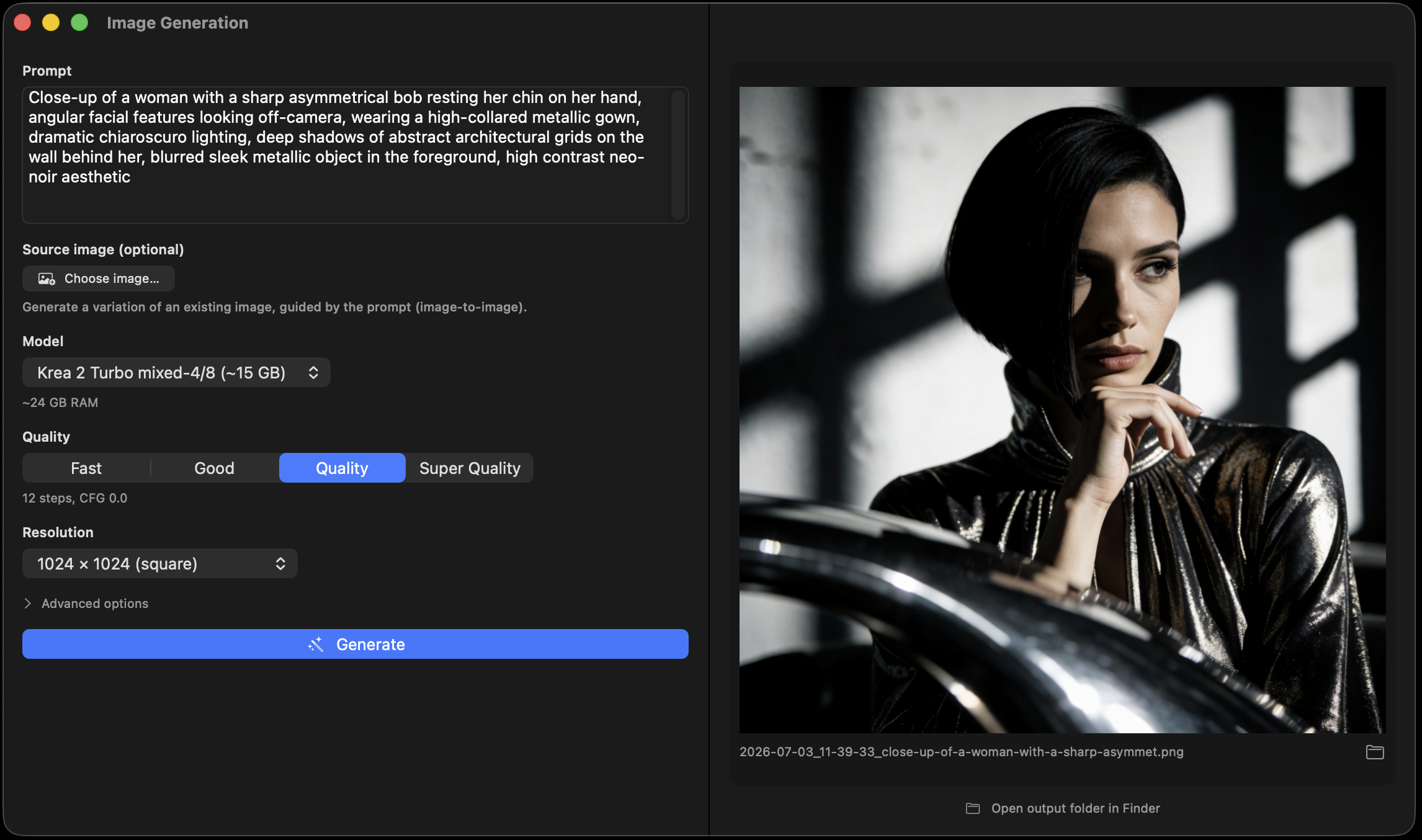
MLX Core Image generation pane with a finished photorealistic render and live progress controls
The Image pane: model, size, steps, seed, source image, and Advanced options — settings persist between sessions.
Instruction editing

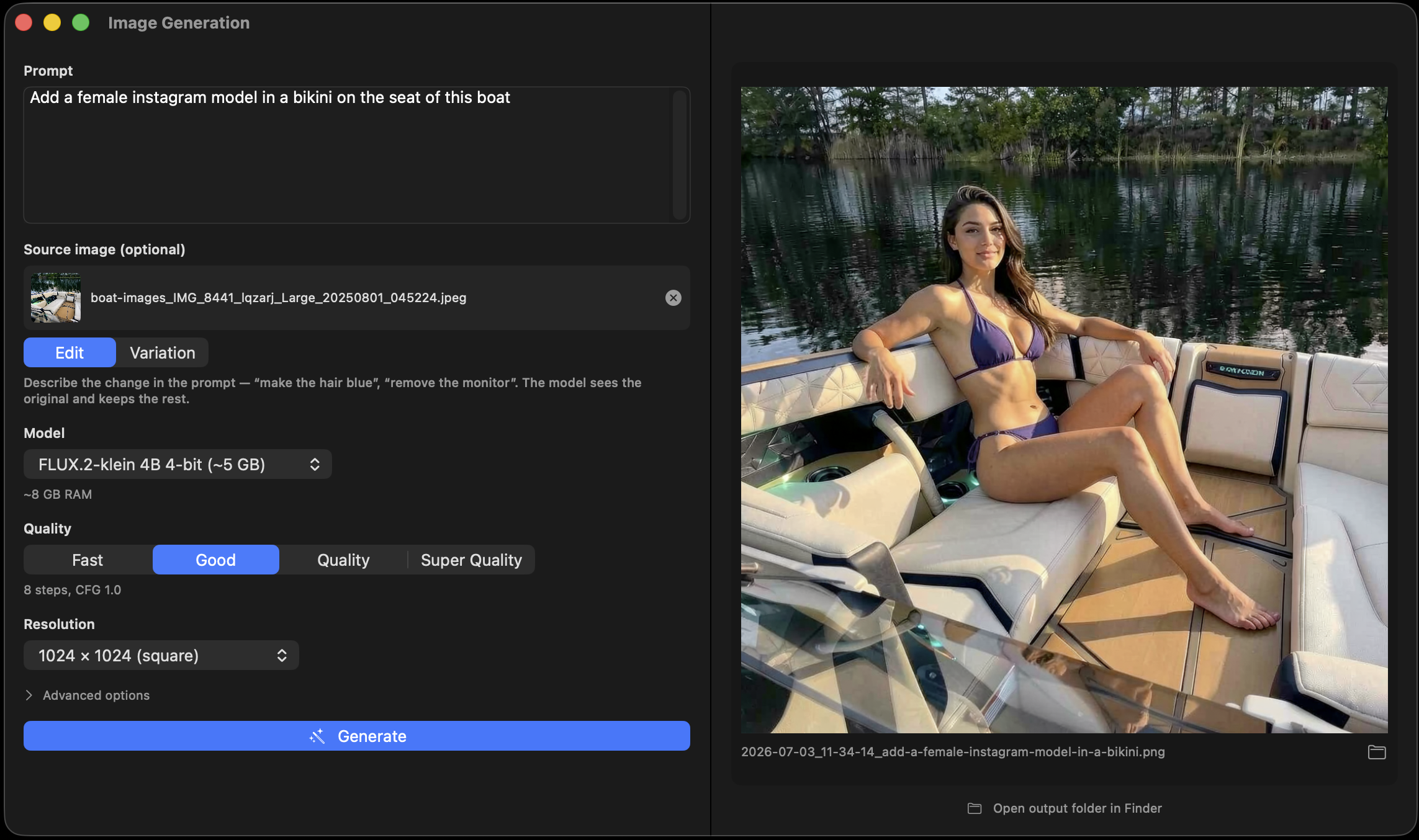
"Add an Instagram model in this boat."

Attach a photo, type what should change, and FLUX.2-klein edits it while keeping the subject, pose, and scene intact. This isn't a noisy remix — your photo rides through the model as a clean in-context reference, the exact mechanism the model was trained on. Measured live: a "make the fox blue" edit kept 97% structural correlation with the original.

Your photo keeps its proportions, too: a portrait or landscape source is recomposed into the output size — never stretched, never squished.

Before and after: an instruction photo edit that changed one attribute while keeping subject and scene
One instruction, same subject, same scene.
Variations

Image-to-image, with a strength dial

Every image model — Krea-2 included — takes a source image plus a strength slider: low for a subtle remix that keeps the composition, high for a full re-imagination that keeps only the vibe. Sources with a different shape than the output are center-cropped, never distorted.

Both VAE encoders were validated by encode→decode round-trips at pixel correlation 0.999+, and they ship inside the model downloads you already have — nothing extra to fetch.

  • Strength 0.2 — same photo, new texture and light.
  • Strength 0.8 — new image that remembers the original.
  • Never stretched — mismatched aspect ratios are covered, not distorted.
  • Semantic edits? Use edit mode — variations remix, instructions edit.
Style LoRAs

Filters on steroids

An Instagram filter adjusts the pixels you already have. A LoRA changes how the model paints: attach one small .safetensors file and every generation comes out watercolor, anime, film-noir, or in the signature look of whoever trained it — composition, lighting, brushwork and all. It's the difference between tinting a photo and hiring a different artist.

mlx-serve applies diffusers-format LoRAs at runtime: no re-quantization, zero quality loss on the base weights, clean detach between requests. Grab any compatible LoRA from HuggingFace or Civitai, point Advanced options at the file, and dial the strength. The same mechanism restyles LTX video generations too.

API — /v1/images/generations
curl http://localhost:11234/v1/images/generations -d '{
  "prompt": "a lighthouse at dusk, long exposure",
  "size":   "1024x1024",
  "image":  "<base64 source photo>",   // optional
  "mode":   "edit",                     // or "variation" + strength
  "lora_path":  "/path/to/watercolor.safetensors",
  "lora_scale": 0.9
}'

Local image generation, answered

Do I need Python, ComfyUI, or a venv?

No. The whole pipeline — text encoder, diffusion transformer, VAE — runs inside the same native Zig server that does chat, through MLX. Click Download in the Image pane, then Generate.

How is instruction editing different from img2img?

Img2img (variation mode) re-noises your photo and re-imagines it — great for remixes, useless for "change one thing". Edit mode passes your photo as a clean in-context reference and generates fresh, so "remove the monitor in the background" keeps the person, pose, and room. Live measurement: 0.97 structural correlation vs 0.16 without the reference mechanism.

Where do I find LoRAs, and which format works?

Any diffusers-format LoRA .safetensors — the standard on HuggingFace and Civitai. Common alias layouts (lora_A/B, lora_down/up, wrapper prefixes) are handled automatically. Attach under Advanced options or pass lora_path / lora_scale on the API.

How much RAM do I need, and where do images go?

FLUX.2-klein is comfortable on 8–16 GB; Krea-2-Turbo wants ~16 GB. The app pre-checks free memory before generating, and models load on demand and unload after. Outputs land in ~/.mlx-serve/generations/images/, organized by date.

Is anything uploaded anywhere?

No. Generation, editing, and the safety classifier all run on-device. Your source photos and outputs never leave the Mac.

More deep dives

A photo studio that never phones home.

Download MLX Core, grab FLUX.2 or Krea-2 with one click, and generate — or hand it your own photos and start editing with words.